
Waiting-room queue and TV display for a dental clinic
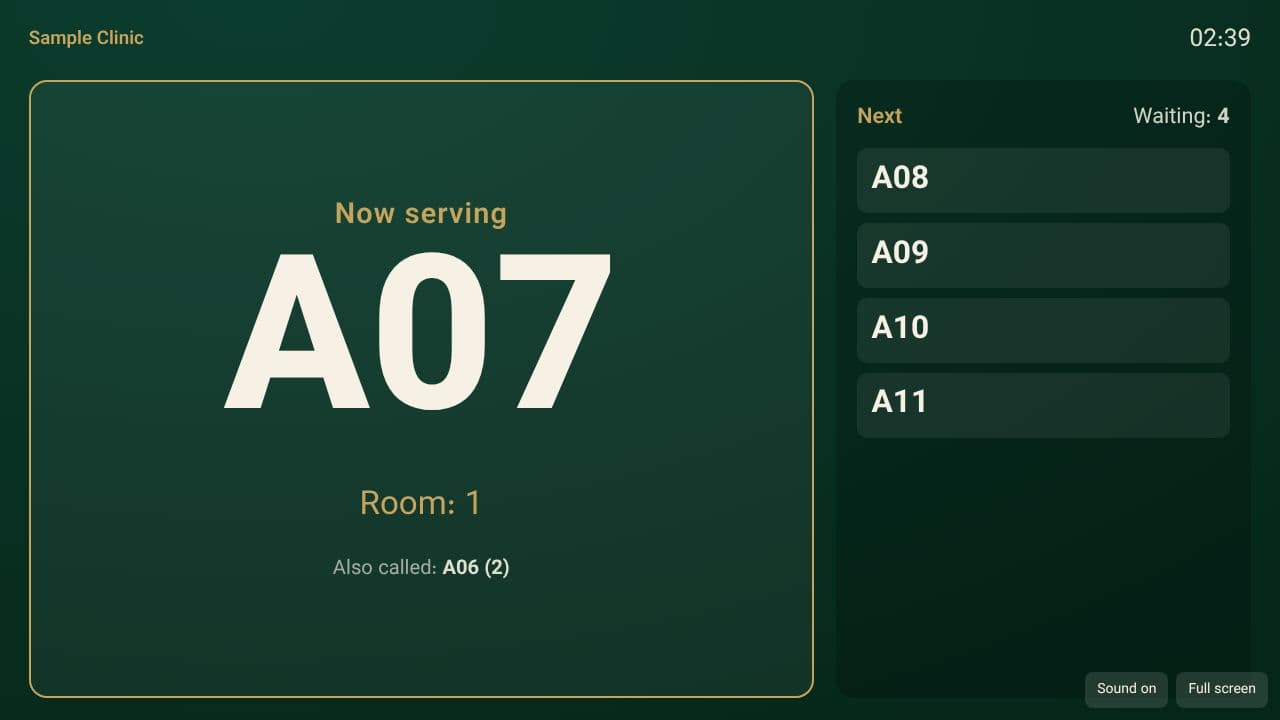
Reception checks a patient in with one button, the dentist calls the next one, and the waiting-room TV shows only a queue number and a desk — never a full name, a phone number or a treatment. In Kurdish, Arabic, Persian and English.
No card needed.
What is ready

Check-in with one button
Check in today's visit, or add a walk-in. The number starts at one each day, and checking in the same visit a second time does not put the patient in the queue twice.

“Call next” for each dentist
If two desks press the button at the same moment, each gets a different patient; one patient is never called from two places at once.

Status and wait time
Waiting, called, in the room, done, skipped and cancelled — with each person's wait time and a warning for a long wait. Same day, in the clinic's own time.
A TV linked by a one-time code
Any browser that can show a page full-screen is enough. The pairing code is valid for ten minutes and works once; any TV can be cut off at any time from settings.

A number, a first name or initials
The default is the number alone. The clinic can choose a first name or initials. There is no mode that shows a full name.

Four languages, right-to-left and left-to-right
The clinic chooses the TV's language. Sound and spoken announcements are optional and work only if the TV's browser allows them.
What the TV never shows
The TV is seen by everyone in the room, so it is sent only what calling a patient needs. These are never sent to it:
- A patient's full name
- A phone number
- A date of birth
- A diagnosis, a reason for the visit or a clinical note
- Medical alerts
- Any internal patient or appointment identifier
How it starts
- In “Queue”, check in today's visits (or add a walk-in).
- In “Settings → Waiting-room TV”, create a pairing code.
- Open /tv in the TV's browser and enter the code. From then on the numbers being called appear on the screen.
What it does not do
It does not send messages to the patient's phone, and no TV or special device comes with it: you use a TV, or any screen with a browser. Sound and spoken announcements depend on the device's browser. The queue does not replace the appointment calendar; it checks in the same visits.
Common questions
Does the TV show patients' names?
Not by default: only the queue number and the desk. The clinic can switch on a first name or initials. A full name, a phone number, a date of birth or a treatment is never sent to the TV.
What device is needed?
Any TV or screen that has a browser and can show a page full-screen. No separate app is installed.
How is a TV linked to the clinic?
With a pairing code the manager creates in settings; it is valid for ten minutes and used once. You can cut that TV off at any time from settings.
What if two staff press “Call next” at the same moment?
Each gets a different patient. One patient is never called twice at once.