
Patient portal and WhatsApp booking, for clinic and patient
A patient of a clinic on Dr Dental IQ opens their own file online with a code sent to their WhatsApp, in Kurdish, Arabic, Persian or English, and where the clinic has connected its own number and switched the assistant on, books, moves or cancels a visit by writing to the clinic on WhatsApp.
What your patients can do without calling
Two doors are open to the patient: the clinic's WhatsApp number, where an assistant answers, and the patient portal, where they see their own file. Neither needs an app to be installed or a password to be remembered.
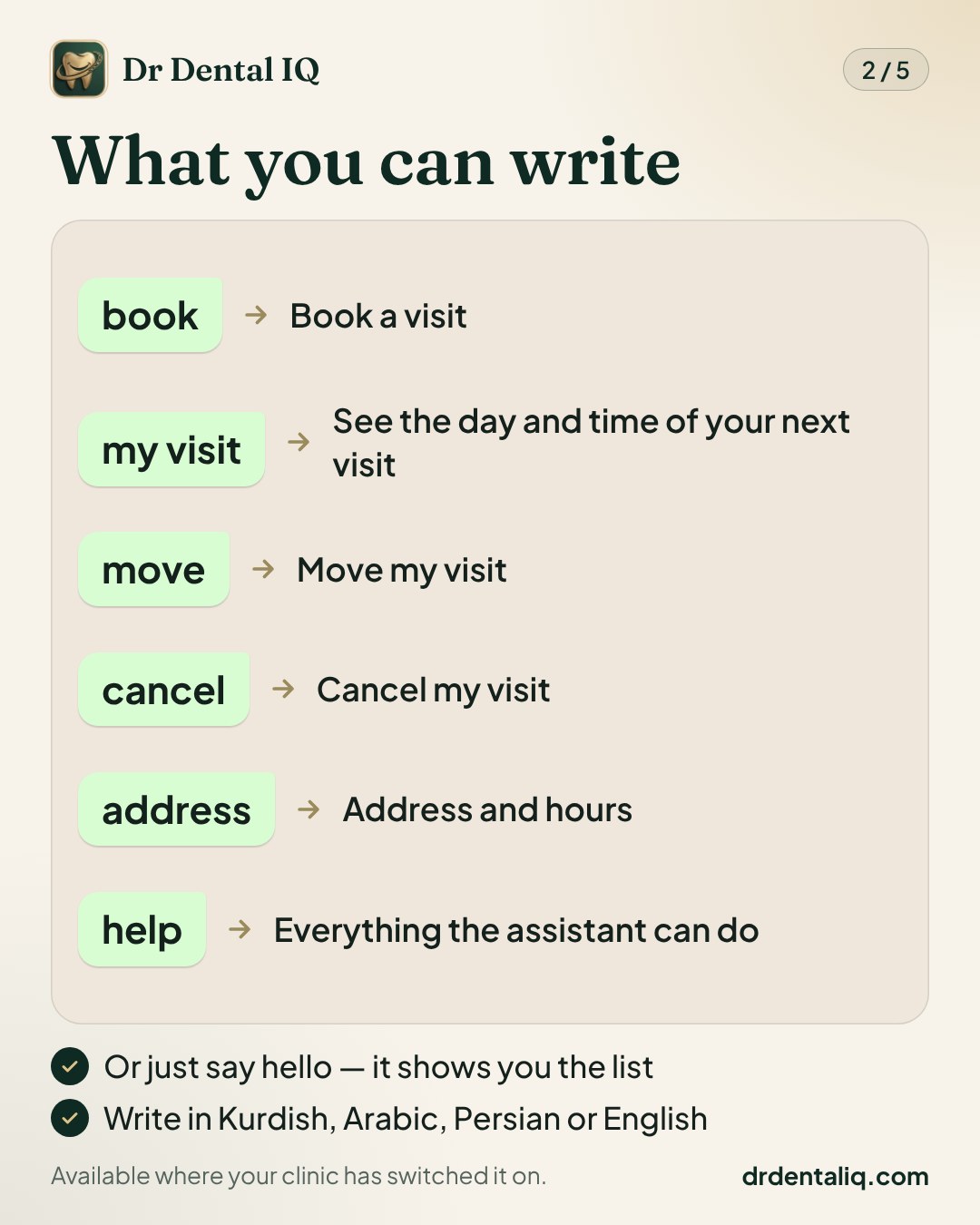
- On WhatsApp, a greeting brings a menu: book a visit, my visit, move my visit, cancel my visit, address and hours, my file online.
- "My visit" shows the coming visits; cancelling asks "are you sure?" first, and the clinic is told.
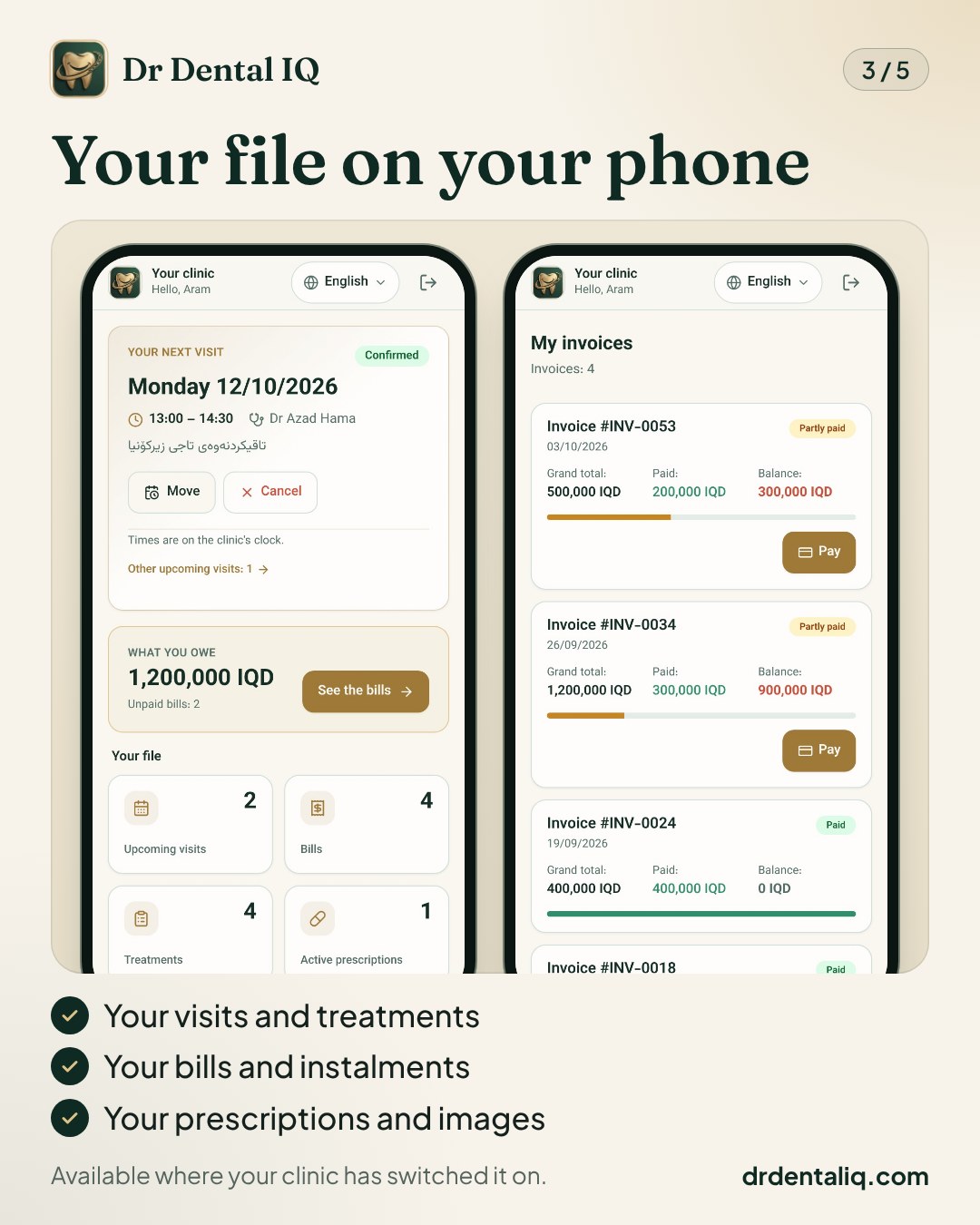
- In the portal: visits, treatments, invoices with what is paid and what remains, instalments, prescriptions, images with the dentist's report, lab work and signed consent forms.
- From the portal the patient can also ask for a new visit, and move or cancel a coming one.
How a patient books on WhatsApp, step by step
This is what the patient does. The assistant offers only the dentists, days and hours the clinic allowed in its settings.
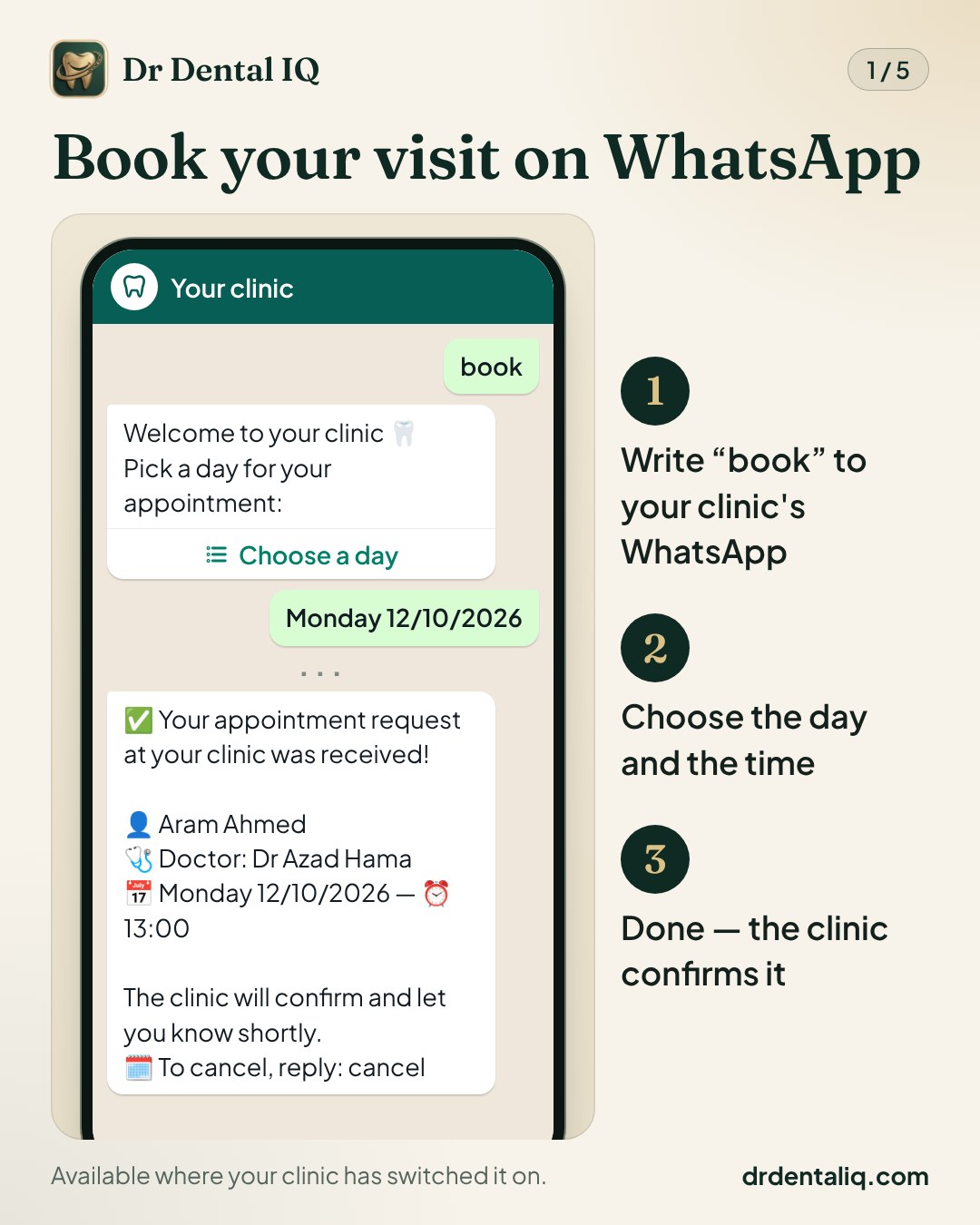
- 1. The patient writes to the clinic's WhatsApp number: a greeting, or the word "book".
- 2. If the clinic has more than one dentist, the assistant asks which one.
- 3. It asks for the service, then the day, then one of the free times of that day.
- 4. A number the clinic does not know yet is asked for the full name and a patient file is opened, unless the clinic accepts registered patients only.
- 5. The patient confirms, and the assistant sends the link to their file.
- 6. The request waits for the clinic's confirmation; once it is confirmed, the visit time arrives on WhatsApp. If the clinic has turned on automatic confirmation, the visit is booked at once.
How a patient opens their file
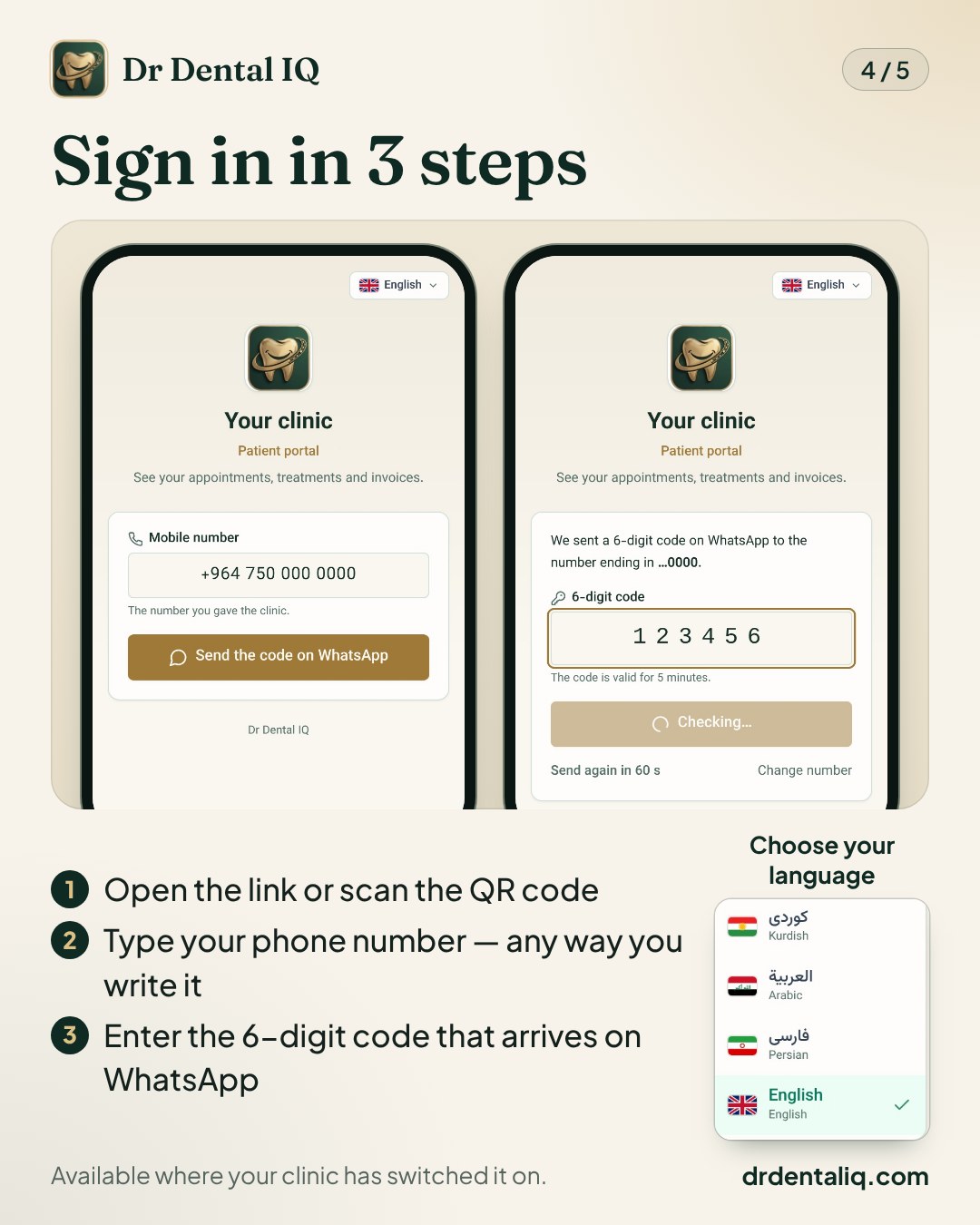
The address of the portal is drdentaliq.com/portal/login. The links and QR codes a clinic hands out open the same page with the clinic and the patient's number already filled in.
- 1. Open the link, or scan the QR code.
- 2. Enter the phone number the clinic has. It is recognised however it is written: starting with 0, or with the country code.
- 3. A 6-digit code arrives on WhatsApp; type it in. After five wrong codes the number is closed for 15 minutes.
- 4. Choose the language from the menu: Kurdish, Arabic, Persian or English.
How to tell your patients
A portal nobody knows about is used by nobody. There are five ways to tell patients, and in none of them does the patient have to type an address.
- The poster: on the "Patient kit" page of the WhatsApp centre, print an A4 poster with two QR codes — book on WhatsApp, open my file — in four languages, and put it at the desk.
- Printed invoices and receipts: a small QR code at the foot of the page. Off until the clinic switches it on.
- "Send portal link": a button on the patient's page sends that patient their own link on WhatsApp.
- Automatic invitation: when the desk registers a new patient, the invitation goes by itself. Off until the clinic switches it on, and it needs the template "patient_portal_invite" approved by Meta.
- The clinic's public page: the link to the portal is on the same page as the "book on WhatsApp" button.
What is honest to expect
Said plainly, so that nobody promises a patient more than they will find.
- The assistant needs the clinic's own WhatsApp number, and it is off until the clinic switches it on. There is no assistant on the trial number.
- A booking made with the assistant or in the portal is a request: it waits for the clinic's confirmation, unless the clinic turned on automatic confirmation for the assistant.
- Paying is a reported transfer, not a card payment: the patient sees the accounts the clinic entered, transfers, and sends the reference or a photo of the receipt; the desk confirms it.
- Four languages: the portal has a language menu and the assistant answers in the language the patient writes in. The clinic's automatic messages go in the clinic's own language.
- The assistant moves or cancels the patient's next visit only; for anything else the patient calls the clinic.
Questions patients ask
These answers are written to the patient. The whole list is on the FAQ page, in the section "For your patients", and a clinic can send its patients the link to that section.
- How do I see my file? Open the link the clinic sent you, or scan the QR code at the clinic; drdentaliq.com/portal/login is the same page. Enter your phone number, then the 6-digit code that arrives on your WhatsApp. Inside you will find your visits, treatments, invoices, prescriptions and images.
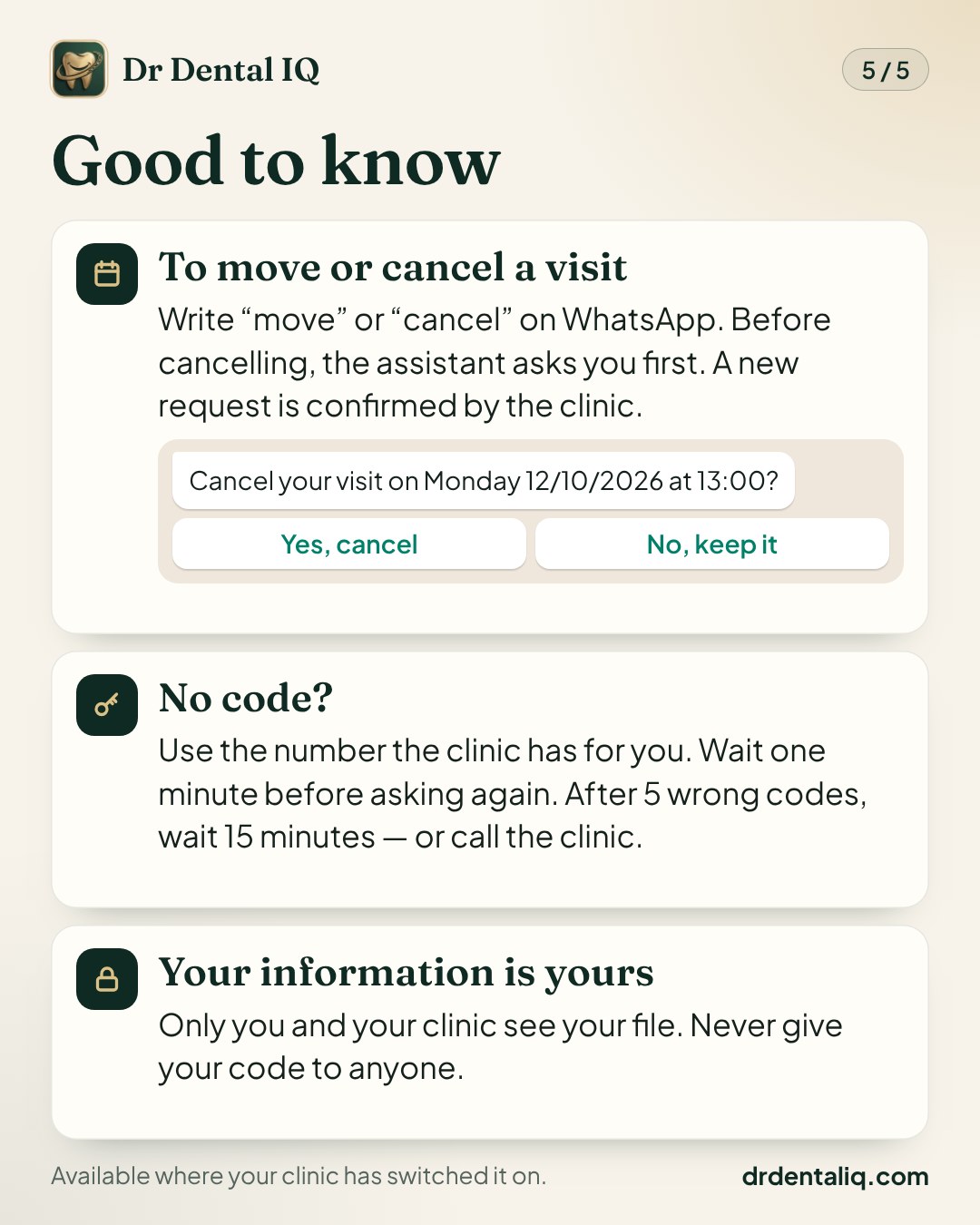
- I did not get the code — what now? Check that you typed the number the clinic has for you; with 0 at the start or with the country code, both work. Wait one minute before asking for a new code, and after five wrong codes wait 15 minutes. If it still does not arrive, call the clinic — they can check the number in your file.
- How do I book a visit on WhatsApp? Send a message to your clinic's WhatsApp number — "hello" or the word "book" is enough. The assistant will ask which dentist, which service, which day and which time; just pick from the list each time. Your request goes to the clinic, and you get a message as soon as it is confirmed.
- How do I change or cancel my visit? On WhatsApp, write "move" or "cancel" to the clinic's assistant; before cancelling it asks whether you are sure. You can do the same in your file online, under your visits. Or simply call the clinic.
- How do I pay? At the clinic, as always. If your clinic accepts transfers, the "Pay" page of your file shows its accounts: send the money, then enter the reference number or a photo of the receipt, and the clinic confirms it. There is no card payment on the site.
- Is my information safe, and who can see it? Your file belongs to your clinic and is kept separate from every other clinic's — another clinic cannot open it. To sign in, the phone number alone is not enough: each time, a code is sent to your own WhatsApp. Do not give that code to anyone.